Digital room sign: the complete guide for offices, education, and public administration

Printed schedules, paper signs in plastic holders, handwritten “Occupied” notes, many buildings still rely on paper signs that become outdated almost immediately. Room booking displays replace these temporary solutions with digital signage that updates automatically from your calendar or meeting room booking system.

As employees continue to return to the office, making better use of available space has become a growing priority. According to the latest CBRE Global Workplace & Occupancy Insights, report, the average office occupancy rate worldwide increased from 38% in 2024 to 53%.

As a result, real-time room availability and automated booking workflows are becoming the standard across businesses, educational institutions, and public sector organizations.


What is a meeting room digital room sign?

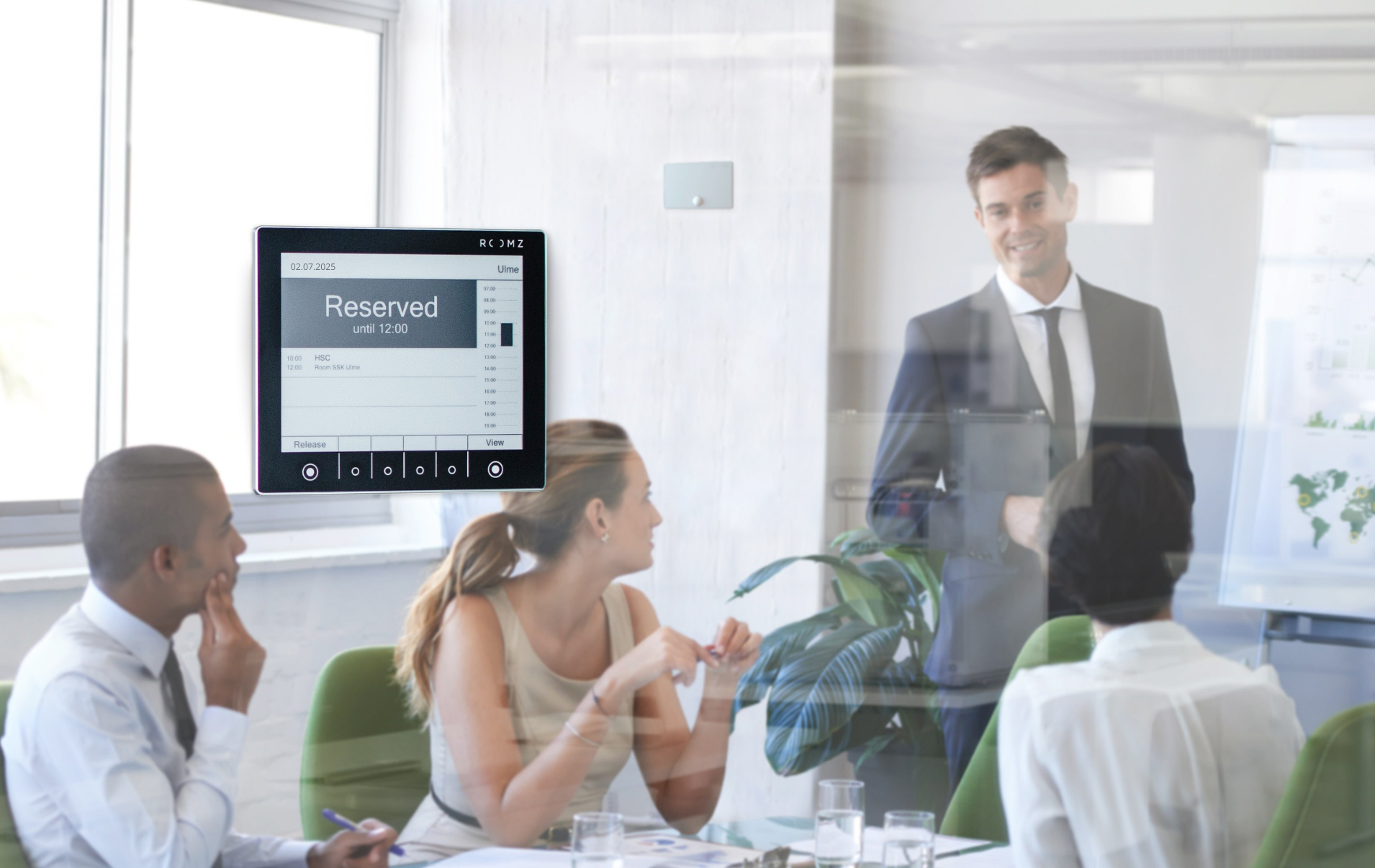
Digital signage for meeting rooms are digital door signs installed outside meeting rooms. They display real-time information such as the room name, occupancy status, upcoming bookings and, depending on the environment, schedules or timetables. The information is automatically synchronized with a calendar or room booking system, eliminating the need to manually update paper signs.

Depending on the manufacturer, these solutions may also be referred to as room booking displays, conference room scheduler, meeting room digital signage, or digital room signage. While the terminology varies, they all describe the same type of solution, designed to improve workspace management and communication throughout a building.
Requirements differ depending on the environment. In offices, the primary goal is to display meeting room availability and simplify room booking. In schools and universities, the displays show class schedules and room changes. In public administration, they help inform visitors about meetings, appointments, or scheduled events. More than simply displaying whether a room is available or occupied, a meeting room digital door sign should be adapted to the way the building is used.

Use cases: from meeting rooms to classrooms

In practice, digital room signs are mainly used in three types of environments:
  • Educational institutions
    Schools, universities, and campuses can replace printed timetables with digital door signs that are always up to date. The display automatically shows class schedules, room changes, and reservations. Information is synchronized with the timetable management software or room booking system, as demonstrated by the ROOMZ Education Solution.
    Learn more about ROOMZ Education Solution →
  • Meeting rooms in the workplace
    The display shows the room occupancy status and allows employees to make an instant booking directly outside the meeting room. As part of a meeting room digital signage solution, digital door signs improve the workplace experience by making room availability visible at a glance, as demonstrated by the ROOMZ Display.
    Learn more about ROOMZ Display →
  • Public sector, councils, and healthcare
    Room assignments, consultations, and meetings are displayed in real time on the room booking display, helping visitors find the right location while improving day-to-day coordination for staff.

Key benefits of digital room signs

No matter the industry, meeting room digital signage offer several key benefits.
  • Always up-to-date information
    Any change made to the calendar or timetable is reflected on the display instantly. There is no need to print, replace, or check paper signs, and users no longer arrive at a meeting room with outdated information.
  • Better space utilization
    In many organizations, meeting rooms are occupied less than 40% of the time on average. A room booking display makes available time slots visible at a glance and, depending on the solution, allows users to make an instant booking directly outside the room.
  • Simplified management and reduced administrative workload
    All displays are managed from a centralized portal, from room assignments and display layouts to automatic firmware updates. Centralized management significantly reduces the repetitive administrative work associated with paper signs and traditional room signage.
  • A more professional workplace
    Consistent, elegantly designed displays enhance corridors, reception areas, and meeting spaces. They provide clear, modern signage for both visitors and employees while reinforcing a professional workplace environment.
  • A more sustainable solution
    There is no need for paper signs or laminated notices anymore. Thanks to E Ink® technology, room booking displays consume very little power. We will take a closer look at the different display technologies later in this guide.
The value of digital door signs depends on how your spaces are managed today. Organizations that still rely on printed timetables can eliminate hours of manual work, while companies with busy calendars but underused meeting rooms can make far better use of their available space.
The biggest benefits become apparent in larger buildings, where consistency across every meeting room and collaborative space makes all the difference. When room availability, instant booking, and centralized management work together, fewer questions end up at reception, the front desk, or the facility management team. Employees, students, and visitors can quickly see which rooms are available, what is happening in each space, and whether any schedule changes have already been updated.

How digital door signs work?

A digital door sign connects to your network over Wi-Fi and synchronizes with your existing calendar or room booking system, including Microsoft Outlook, Exchange, Microsoft 365, and Google Workspace. If your organization uses Microsoft Teams, Teams bookings are automatically displayed outside the meeting room. ROOMZ supports more than 20 room booking systems. Any change made in the calendar appears on the display instantly, and any booking made directly from the display is immediately synchronized back to the calendar.
Everything is managed from a centralized portal. Administrators can assign rooms, customize display layouts, and deploy firmware updates automatically. Getting started is straightforward, most ROOMZ customers have their first room up and running in less than an hour, including display installation.
Modern wireless solutions use E Ink® technology, also known as e-paper. An E Ink® display only consumes power when the content changes, allowing it to run for years on a single battery. When paired with an occupancy sensor such as the ROOMZ Sensor, the system can also detect ghost meetings and automatically release booked rooms that are never used.
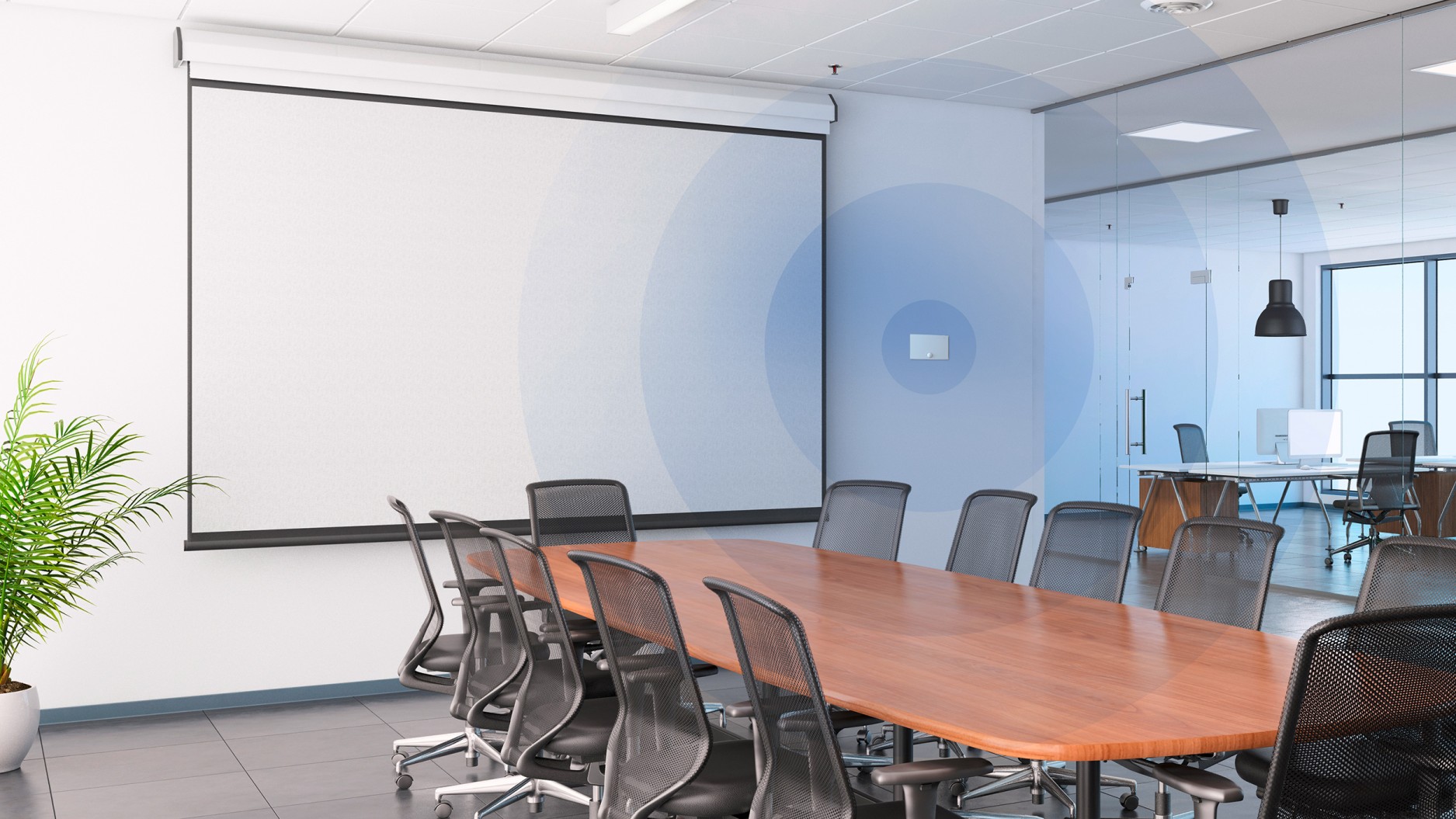
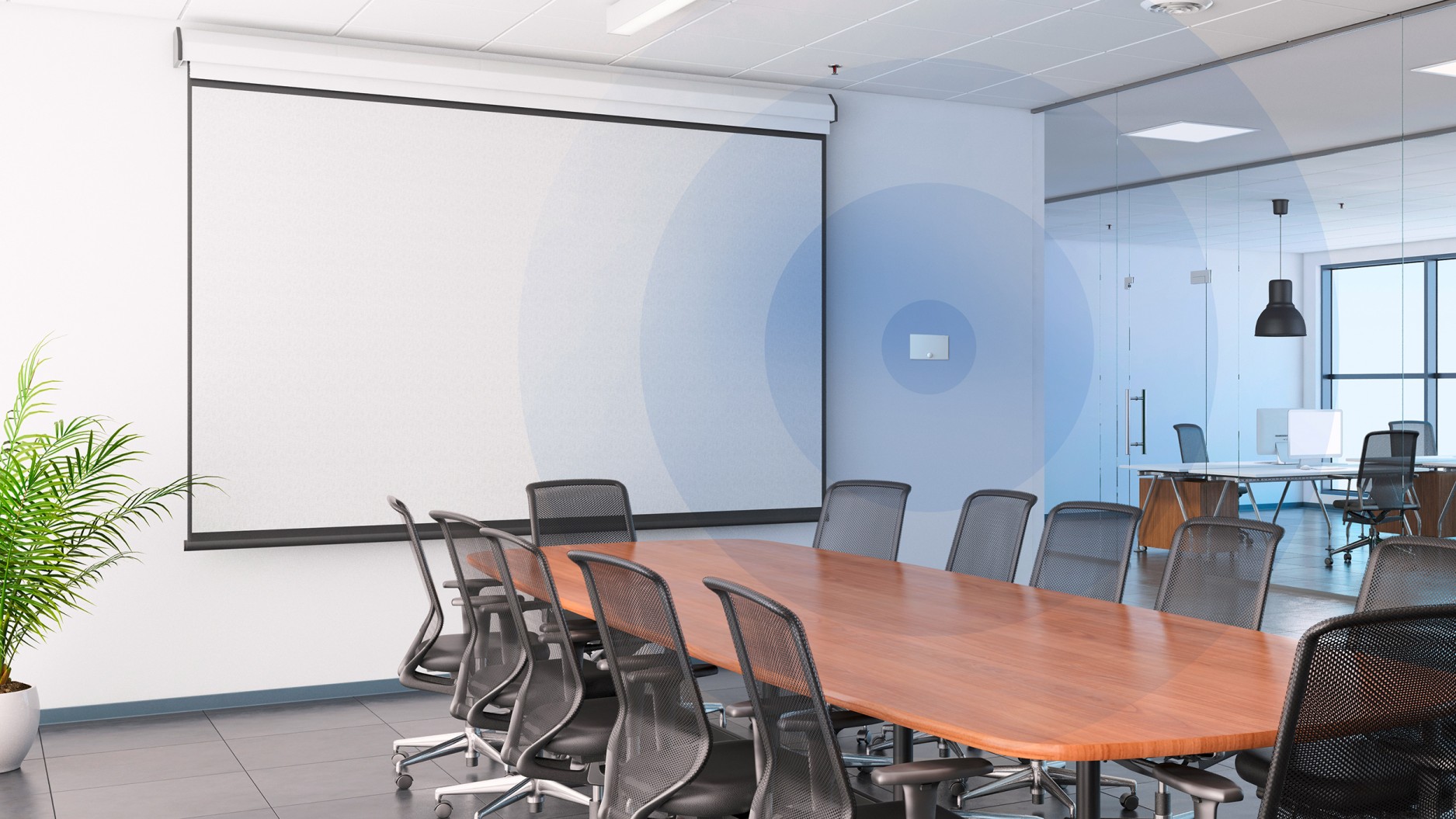
Meeting room occupancy sensor

The ROOMZ Occupancy Sensor detects actual meeting room occupancy and automatically releases reservations for rooms that remain empty.

E-Ink® vs. LCD: which technology is right for you?

When it comes to digital door sign hardware, two technologies have become the industry standard: wired TFT LCD panels powered by Power over Ethernet (PoE), and wireless E Ink® displays powered by batteries and connected over Wi-Fi. The differences become clear when comparing installation costs and long-term operation.


Criteria Wireless E Ink® digital door sign Wired TFT LCD panel
Installation Mounts in minutes on glass, wood, or walls without cables or drilling Requires power and network cabling or PoE, often involving electrical work and drilling
Power supply Battery powered, up to 5 years of battery life with the ROOMZ Display Continuous power via electrical wiring or a PoE switch
Power consumption Minimal, E Ink® only consumes power when the display content changes Continuous power consumption, significantly higher over time
Readability Nearly 180° viewing angle with a paper-like display Typically limited to a 90° to 120° viewing angle
Scalability Add new rooms, floors, or buildings in minutes Every expansion requires additional cabling
Maintenance No operating system and automatic firmware updates Operating system requiring regular updates and security patches
Security No operating system, no cables, enterprise-grade secure Wi-Fi connection, and no personal data stored on the device Operating system with potential security vulnerabilities, cabling as a possible attack vector, and data stored locally on the device


The environmental impact is just as compelling. Wired displays consume up to 10,000 times more energy than battery-powered E Ink® displays. Over an eight-year period, 100 wireless room booking displays can reduce CO₂ emissions by approximately 14 tons. The ROOMZ Display is designed to last more than 10 years, while the typical lifespan of a wired TFT LCD display operating 24/7 ranges from 3 to 7 years, depending on its quality.

Read the ROOMZ Display energy consumption study →

Installation: cable-free digital room signage
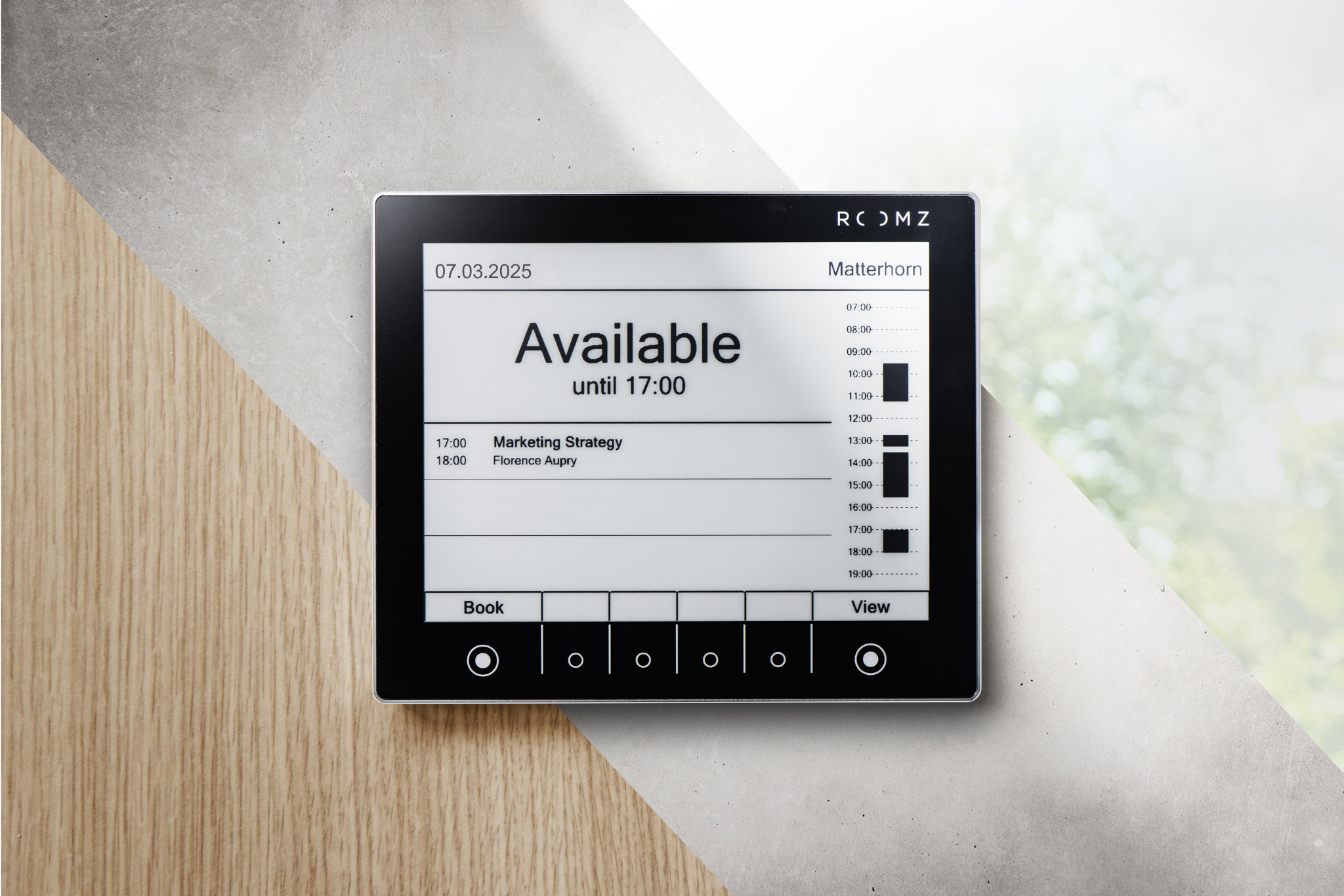
One of the biggest advantages of wireless displays becomes clear during installation. They mount directly onto smooth surfaces such as glass, metal, or wood, with no drilling or cabling required. This makes digital room signage a practical solution for environments where electrical work is expensive, disruptive, or simply not possible, such as historic buildings, leased offices, or schools that remain in daily use.
Whether you are equipping a single meeting room, an entire floor, or multiple buildings, wireless displays can be installed without an electrician. And if your workspace changes or you relocate, the display can simply move with you, with no complex removal or reinstallation required.
Digital room sign

E Ink® displays, such as the ROOMZ Display, mount quickly and cleanly to smooth surfaces using an adhesive mounting system.

What to look for when choosing digital door signs?

In practice, six criteria matter most:
  1. Integration with the existing collaboration tools
    Does the solution support your existing calendars and room booking platforms, such as Outlook, Exchange, Microsoft 365, Google Workspace, Microsoft Teams, or industry-specific software such as school management systems (e.g. Untis)?
  2. Installation and scalability
    How quickly can a room be equipped, and how easy is it to expand the deployment? Wireless systems scale across multiple rooms, floors, and locations without requiring an electrician.
  3. Security and data protection
    Look for encrypted communication (HTTPS/TLS), privacy-conscious data display, and an ISO 27001-certified provider. The processing of personal data should comply with GDPR requirements. The ROOMZ Display does not store or process personal data locally and has no operating system, making it highly resistant to malware installation.
  4. Total cost of ownership (TCO)
    Evaluate the solution over its entire lifespan, not just the purchase price. Consider hardware, software licenses, cabling, PoE switches, electricity, and maintenance. Also factor in installation and cabling costs, typically around €500 to €1,000 per cable, as well as the cost of replacing the device at the end of its service life.
  5. Design and materials
    Digital door signs help shape the first impression of corridors, reception areas, and meeting spaces. Real glass and aluminum create a more premium look than plastic, while a matte E Ink® surface eliminates glare and resists fingerprints.
  6. Expandability
    The greatest value comes from combining digital door signs with occupancy sensors to eliminate no-shows and analytics tools that measure how meeting rooms are actually used. Solutions such as ROOMZ Advanced Analytics provide the insights needed to make informed workplace and space planning decisions.

Learn more about ROOMZ Advanced Analytics →

Before rolling out digital door signs across your organization, it is worth starting with a pilot deployment in just a few rooms. This gives IT and Facility Management teams the opportunity to validate Wi-Fi coverage, calendar integration, installation, display layouts, and user adoption in a real-world environment.

A pilot project also reduces the risks associated with larger deployments across multiple floors or locations, while helping you identify the features that deliver the most value, whether that is instant booking at the display, occupancy sensing, workplace analytics, or dedicated views for classrooms and lecture halls.
Worksplace Analytics

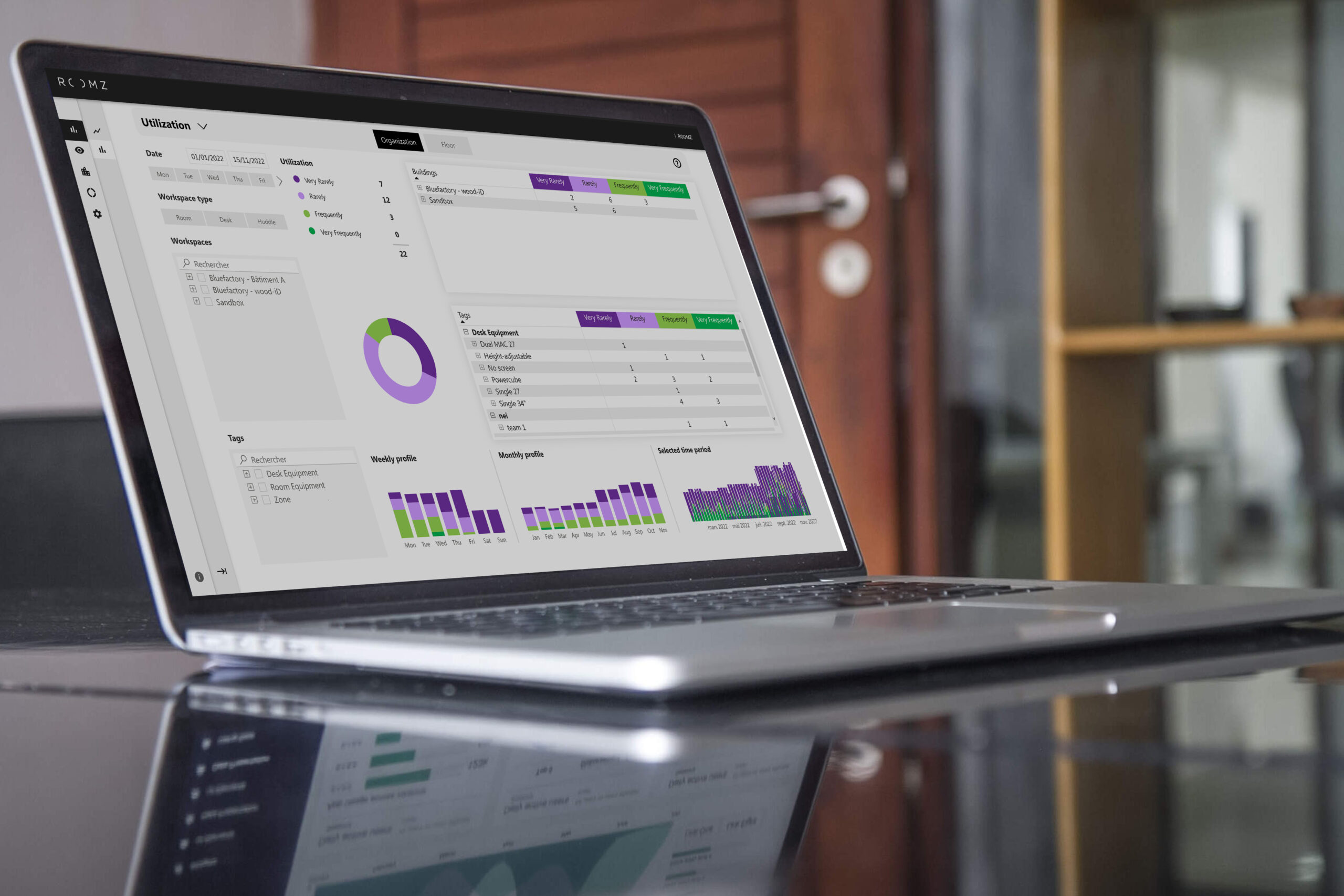
ROOMZ Advanced Analytics provides detailed insights into how meeting rooms are actually used, helping organizations make data-driven decisions to optimize their workplace strategy.

Real-world examples: ETH Zurich, Cantonal School of Olten, and BOBST

ETH Zurich installed more than 800 e-paper displays across its meeting rooms, seminar rooms, and lecture halls, making it easy for students to find available spaces between classes. A wireless solution was essential because the university’s historic main building could not be retrofitted with cabling. Today, the ROOMZ Server is connected to more than 10 different room booking systems.
As part of a major campus renovation, the Cantonal School of Olten replaced printed timetables outside 85 classrooms with room booking displays connected to its school management software. Isabelle Berger, IT Services Manager, explains the limitations of the previous system: «Each semester, someone had to take down the old schedules from all 100 classrooms and replace them with the new ones. As soon as a change occurred, the schedules were no longer up to date.»
BOBST, one of the world’s leading suppliers of equipment for the packaging industry, modernized its headquarters in Lausanne through its New Workplace at BSA project, involving nearly 1,000 employees. The company selected ROOMZ to support its vision of a more sustainable and efficient workplace. Stéphane Mader, Head of Group Marketing & Communications & Workplace Program Manager, explains: «Choosing ROOMZ also means supporting a local company that shares our sustainable vision and our demand for quality.»

Discover these projects, along with many more success stories from organizations such as ABB, Lonza and UNESCO, in the ROOMZ case studies.

Read the case studies →

Conclusion: it is time to replace paper signs outside meeting rooms

Digital door signs make room signage accurate, low maintenance, and measurable. Room availability, schedules, and names update automatically, instant bookings can be made directly at the door, and, when combined with occupancy sensors, the system provides the data needed to make better space management decisions. The most important factors when choosing a solution are integration, security, total cost of ownership (TCO), and scalability.
The best way to experience the benefits is in your own workplace. With the ROOMZ Start Kits, you can equip your first meeting room in less than an hour, with no cabling required. Swiss made, and trusted for over 10 years by organizations including ETH Zurich, the Cantonal School of Olten, the University of Basel, ABB, and many more.
ROOMZ Experience Box

Experience ROOMZ in your workplace

Install your first ROOMZ Display in less than an hour, with no cabling required. Discover how easy it is to deploy and manage a modern room booking display solution.

Discover ROOMZ Starter Kits →

Author & Technical review
Nadia OBEIDA ROOMZ Workspace Management

Nadia Obeida

Author

Creates and curates ROOMZ content focused on room booking, workplace experience, and digital workplace solutions.

Nadia Obeida is Marketing Manager at ROOMZ. For this guide, she translated the needs of IT, Facility Management, and Office Management teams into a practical decision-making resource. She was also responsible for the article’s SEO/GEO strategy and editorial structure.

Linkedin profile Nadia Obeida’s LinkedIn profile

Roger Meier CEO ROOMZ

Roger Meier

Co-author & technical reviewer

Contributes product expertise and real-world experience gained from ROOMZ customer projects.

Roger Meier is the Founder and CEO of ROOMZ SA. He reviewed this guide from a technical perspective, ensuring the accuracy of its content on technology, integrations, scalability, and real-world deployment.


LinkedIn profile
Roger Meier’s LinkedIn profile

Why choose an e-ink meeting room booking display for your workplace?

E-ink technology has become a discreet yet highly effective solution for modern workplaces. Originally developed for e-readers, it now stands as a powerful alternative to traditional digital signage in professional environments. At ROOMZ, this technology powers our meeting room booking displays, offering a simple, energy-efficient, and elegant way to manage meeting spaces.
.

Ultra-low energy consumption for efficient workplaces

E-ink displays stand out for their extremely low power use. Unlike traditional screens, they run on battery power and only consume energy when the content changes, making them remarkably efficient.
In an office environment, this is ideal since meeting room information does not need constant updates throughout the day.

Taking the ROOMZ meeting room booking display as an example, this technology is pushed to its full potential: our displays consume up to 10,000 times less energy than a traditional wired screen. Thanks to this energy efficiency, the displays offer up to five years of battery life before replacement, while remaining connected and easy to manage remotely.

Updates are performed remotely, ensuring content is always current without any on-site maintenance. This significantly reduces both operational costs and technical complexity.

👉 Discover our sustainability commitments
.

Clear, paper-like digital signage in every workspace

With high contrast and a 180-degree viewing angle, e-ink displays deliver outstanding readability under any lighting conditions. Unlike backlit screens, they do not emit light but reflect ambient light, similar to paper.

The result: no glare, no visual strain, and perfect readability even in direct sunlight or under bright office lighting. This improves user comfort and ensures information remains visible all day long.

E-paper technology also maintains image quality over time, with sharp contrast and stable performance even after years of use.
.

A reliable display with a long lifespan

E-ink displays generate no heat, reducing wear on components and preventing overheating or electrical stress. They require no fans, no complex maintenance, and no wired installation.

This makes them an ideal choice for organizations seeking reliable, low-maintenance, and energy-saving digital signage. Combined with wireless connectivity, ROOMZ displays can be installed anywhere in the workplace—without cables or proximity to a power source.
.


.
E-ink displays provide a robust, reliable, and sustainable way to manage meeting rooms. They combine energy efficiency, flexibility, and visual clarity while supporting greener office operations. ROOMZ displays go beyond digital signage—they simplify meeting room management and help shape connected, agile, and responsible workspaces.

You might also like:

• Download our study on ROOMZ display energy consumption
Meeting room management: why choose long-lasting, maintenance-free solutions? (Blog)
.

How workspace presence sensors support meeting room management and reduce ghost meetings?

What is a ghost meeting?

A ghost meeting refers to a meeting room that has been reserved without being used. These no-show bookings lead to hidden costs, employee frustration, and reduced workplace efficiency.
In today’s workplace management landscape, ghost meetings represent a growing challenge for space optimization.

The growing issue of ghost meetings in modern workplaces

According to industry studies, .an average of 30% of meeting room bookings go unattended.. This issue is especially prevalent in growing organizations, where the demand for collaboration space often exceeds supply.

Ghost meetings are fueled by a variety of everyday office behaviors:

  • Canceled meetings that remain on the calendar
  • Employees who forget to release a room when it is no longer needed
  • Recurring meetings that are no longer taking place physically, especially with the rise of hybrid work. A recurring Teams meeting might still appear in the schedule, while all participants are actually joining remotely, leaving the meeting room booked but empty

For workplace managers, this situation quickly becomes an operational headache.

Understanding the disconnect between booking data and actual usage

The issue with underutilized meeting rooms lies in the gap between the booking rate and the actual usage rate. At first glance, calendars appear fully booked and rooms seem constantly in use. In reality, many of them sit empty.

This disconnect creates a frustrating experience: employees report that it is impossible to find available rooms, while companies wrongly assume they are lacking collaborative spaces. In fact, the root of the problem lies in how rooms are managed, not in how many rooms exist.

This gap between perceived demand and real usage leads to wasted real estate resources and a decline in both team productivity and employee satisfaction. Only by comparing booking data with actual occupancy can organizations uncover this inefficiency and take action.

The ROOMZ solution: smart occupancy sensors and automatic room release

ROOMZ presence sensors offer a smart, automated solution to ghost meetings by detecting whether a meeting room is actually in use. These passive infrared sensors are discreet and fully anonymized. When no presence is detected after a set period of time, the system automatically releases the room, making it instantly available for others.

The logic is simple and effective: If no one shows up within the configured timeframe, the booking is canceled and the room is freed up automatically.
This delay can be adjusted based on the meeting room type.

For instance:

  • Small meeting rooms: auto-release after 15 minutes
  • Large rooms for 15–20 people (typically booked for half a day): auto-release after 1 hour

This automation removes the need for manual intervention and ensures optimal usage of meeting rooms across the organization.


ROOMZ Presence sensor for meeting rooms
© ROOMZ Occupancy Sensor for Meeting Room

What are the benefits for workplace optimization?

Implementing ROOMZ sensors along with scheduling panels transforms the way meeting rooms are managed, with immediate and tangible results:

  • Less time wasted: no more wandering hallways looking for a free room
  • Reduced stress and frustration: employees can instantly identify available rooms without delays
  • Real-time visibility: up-to-date room availability is displayed on digital signage
  • Support for ad-hoc collaboration: rooms become instantly available when no one shows up
  • Data-driven decisions: detailed usage analytics help companies better assess actual space needs and plan accordingly

By eliminating ghost meetings, organizations streamline the use of collaboration spaces, optimize real estate investments, and create a smoother, more productive work environment for their teams.


You may also be interested in:

Meeting room booking system: why choosing a sustainable, maintenance-free solution makes a real difference

Choosing durable, maintenance-free hardware for your meeting room booking system helps:

    • Optimize operational costs
    • Reduce technical constraints
    • Deliver a smooth experience to employees

When selecting a door signage solution, wired panels may at first appear more powerful. At ROOMZ, we believe the opposite is true. What really matters is often overlooked: the durability and simplicity of the hardware.

In many workplace projects, cabled booking displays can quickly show their limits:

    • Common issues include overheating touchscreen panels
    • Complex cabling installations
    • Frequent software updates
    • High energy consumption

What is supposed to streamline workspace management may ultimately create operational and budgetary challenges.

.

1. The tangible benefits of low-power IT equipment

    • Cost optimization through long-lasting technology: Fewer replacements and less technical intervention mean long-term savings. Durable hardware, such as electronic ink (e-ink) displays, offers a significantly longer lifespan compared to traditional booking tablets.
      For Facility Managers, this translates into better budget predictability and the ability to allocate resources to other strategic priorities.
    •  A smooth experience for users: Autonomous systems guarantee smooth usage without downtime. Employees benefit from a frictionless booking experience, while IT Managers face fewer support requests and ongoing maintenance tasks.
    • A strong environmental commitment: Beyond cost considerations, investing in sustainable equipment supports broader ESG initiatives. By reducing the frequency of hardware replacement, companies limit electronic waste and significantly lower the carbon footprint of their office spaces.

.

2. IT security: the risks of embedded meeting room booking systems

Many meeting room booking solutions on the market operate like small computers, running embedded operating systems such as Android or Linux. While these platforms offer advanced capabilities, they also come with two major risk factors that must be considered:

    • Ongoing update management: Each connected device requires regular software patches and updates. Multiplied across dozens or even hundreds of displays, this could become a significant workload for IT teams.
    • Potential vulnerabilities: Embedded systems often store temporarily data such as calendar entries, meeting room names, or user email addresses. Each connected endpoint can become a potential entry point for cyberattacks, especially in highly regulated industries.

Choosing a booking display that runs without an operating system helps reduce security risks at the source and protects sensitive company data.

.

3. ROOMZ, a smart meeting room booking system trusted by ETH Zurich for long-term reliability

At ROOMZ, durability and simplicity are at the core of our approach:

    • Our displays operate without an operating system.
    • They are fully autonomous and wireless
    • They require no preventive maintenance
    • ROOMZ displays consume up to 10,000 times less energy than a wired booking tablet
    • They offer up to 4 years of battery life and a lifespan of 10 to 20 years

All while delivering a reliable user experience.

How is such low energy consumption possible?

    • ROOMZ displays only connect to the server when they need to update meeting room booking information
    • They remain in sleep mode 99% of the time
    • They don’t run any energy-intensive systems

Our very first customer, ETH Zurich, perfectly illustrates the long-term durability of ROOMZ solutions:

“After 7 years of operation, the displays show almost no visible degradation, and we can expect them to last for another 10 years.”

Armin Brunner, Head of ITS Infrastructure

ETH Zurich University ROOMZ


You may also be interested in:

Meeting room booking system: the benefits of digital solutions

Managing office space efficiently is a growing challenge in modern hybrid work environments. With employees splitting time between home and the office, unused meeting rooms and overbooked spaces can lead to frustration, wasted resources, and lost productivity.

The challenges of traditional meeting room management

Relying on manual booking methods such as spreadsheets, emails, or paper calendars often creates confusion:

    • Double bookings or last-minute cancellations
    • Difficulty finding available spaces
    • Increased workload for facility and IT teams

Meeting room schedule displays: solutions and benefits of ROOMZ

1. Real-time updates and visibility of workspaces

Conference room displays provide instant updates on meeting room availability, avoiding misunderstandings and unnecessary trips. Employees can see which rooms are free, who has booked them and for how long.

Two main display types can help optimize space usage:
.

Meeting room entrance display:

    • Placed outside each meeting room to display real-time room availability
    • Shows current and upcoming meetings
    • Daily or weekly view
      .

meeting room booking system display

.
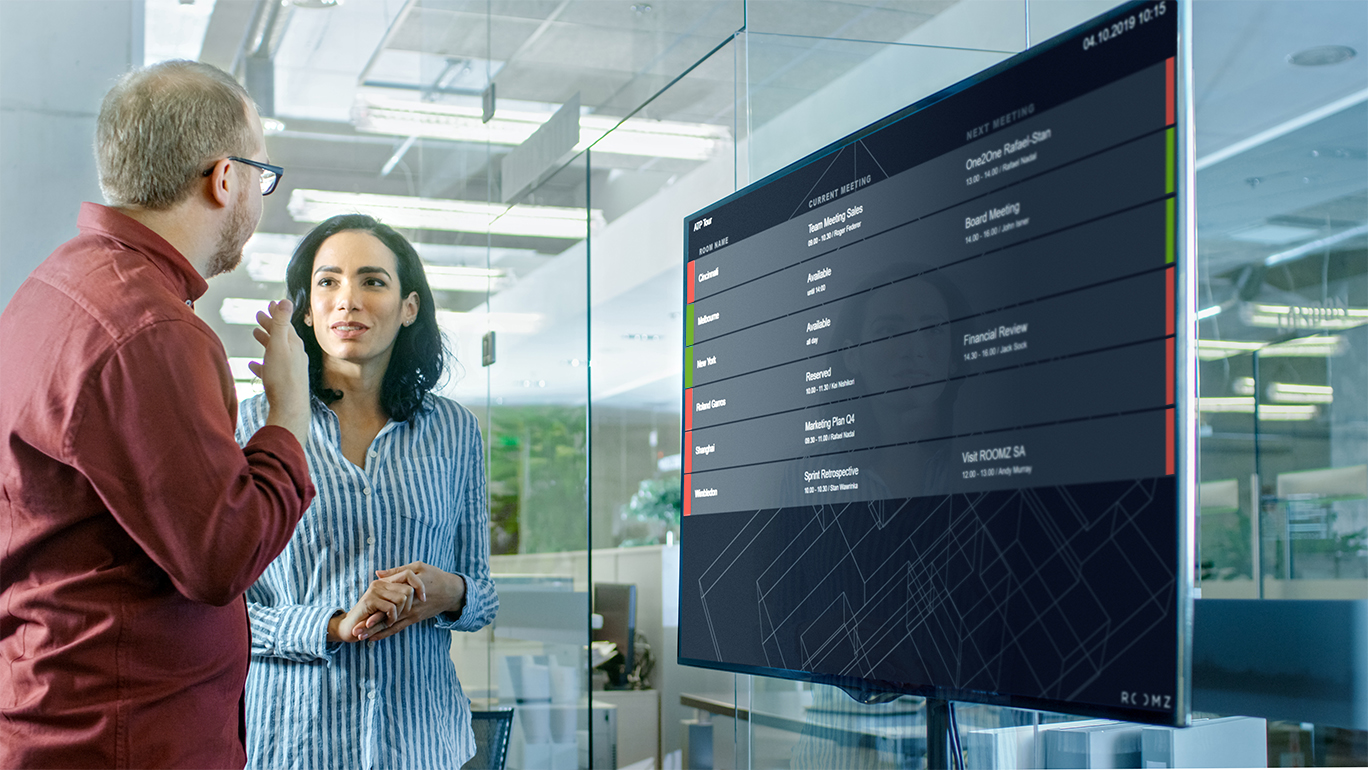
Digital Flightboard displays: centralized meeting room visibility

    • Perfect for use on a floor or across an entire building
    • Provides a clear, bird’s-eye view of all meeting room availability
    • Shows ongoing and upcoming meetings across departments
    • Helps employees navigate the office efficiently
      ..

Digital signage meeting room

2. Cost savings, sustainability and low maintenance

Long-lasting, wireless displays, like ROOMZ, which offer an average battery life of 4 years, help cut maintenance costs and energy consumption. Choosing a display without an operating system further reduces upkeep, removing the need for software updates or complex IT management.
By replacing printed schedules and manual updates, these screens support sustainability goals while lowering operational overhead, making workspace management simpler and more efficient.

3. Optimizing workspace and employee experience: customers feedback

With clear room availability, employees can make quick decisions and avoid wasted time searching for spaces. Hybrid teams benefit from smoother collaboration and better day planning, as highlighted by our customer feedback:

Swiss Red Cross: from old to modern meeting room management:

“In the past, we managed our meeting rooms exclusively within the Outlook resources calendar. Meetings with external partners were posted on the doors with a sheet of A4 paper. Then we discovered ROOMZ at another company. From that point, things moved at lightning speed to deployment within approximately two to three weeks.” Benno Stucki Department Head ICT Services

👉 Discover Swiss Red Cross Story

ABB: enhancing employee experience:

“Easy instant booking: you go to the display, choose the desired reservation period, press the button, done! And the text on the display is readable from any angle. ROOMZ makes our working lives easier.”

👉 Discover ABB Story


You may also be interested in:

Meeting room booking system: 6 essential criteria to make the right choice

What is a meeting room booking system?

A meeting room booking system is a solution that helps employees book meeting rooms and conference spaces in real time. It shows which rooms are available, prevents double bookings, syncs with calendars, and simplifies scheduling. This software improves office efficiency, reduces conflicts, and supports better workspace management in any organization.

Selecting the right meeting room booking system is a strategic decision for any organization aiming to optimize its workspace and support hybrid work models. From ease of installation to real-time usage data, the right solution helps improve efficiency, reduce costs, and enhance the employee experience. Here are six essential criteria to guide your decision.

1. Evaluate meeting room booking system installation requirements

The first thing to consider is how easy the system is to install. A complex deployment can lead to additional costs and potential disruptions during the rollout phase.

Modern systems favor wireless displays that connect via Wi-Fi to existing calendar tools. This approach offers several advantages:

    • Significantly lower installation costs
    • Fast and non-intrusive deployment
    • Maximum flexibility to reconfigure equipment as your needs evolve

A simple installation process makes it easier to scale the solution across different sites or floors without heavy technical involvement.

2. Prioritize scalable solutions

Scalability is key to supporting a growing or evolving workplace. The meeting room booking system you choose must adapt to future changes such as new collaboration areas, relocations, or workspace restructuring.

Traditional wired systems limit flexibility. Each new installation often requires costly and time-consuming cabling work. Wireless and modular solutions, on the other hand, offer greater agility:

    • Add new displays in minutes to cover new meeting rooms or areas
    • Relocate equipment as workspaces change, with minimal effort
    • Better control of long-term investment and maintenance costs

Scalable solutions help organizations future-proof their workspaces and maximize long-term return on investment.

3. Ensure seamless integration with existing tools

Compatibility with existing collaboration tools is non-negotiable. A booking system that integrates with Microsoft Teams, Outlook, or Google Workspace reduces friction and increases adoption.

With full integration, you can:

    • Book rooms directly from your usual calendar interface
    • Automatically synchronize all calendars in one centralized view
    • Provide a smooth and intuitive user experience, with no change in daily habits

A system that fits naturally into your digital ecosystem is much more likely to deliver value across teams.

4. Invest in long-lasting IT equipment

The durability of your meeting room displays impacts on the total cost of ownership. High-quality, low-power hardware reduces maintenance needs and avoids frequent replacements.

Hardware that does not overheat, requires fewer updates, and has long battery life can:

    • Extend operational lifespan
    • Minimize technical downtime
    • Reduce long-term costs while improving reliability

Equipment that does not overheat has a significantly longer lifespan and requires less maintenance. This approach helps prevent frequent replacements and service interruptions that can impact team productivity.

5. Leverage workspace utilization data

Data is a powerful asset when it comes to managing your workplace more effectively. A smart booking system should provide actionable insights into how spaces are really used.

Key metrics to track include:

    • Room occupancy rates by time slots or day of the week
    • No-show rates or “ghost meetings”
    • Underused or overbooked areas
    • Usage patterns by department, floor, or building

This data enables smarter space planning, helps reduce real estate costs, and ensures resources are aligned with actual needs.

6. Automate room release to eliminate ghost meetings

Automatic meeting room release is essential for maximizing the availability of your meeting spaces. With the help of occupancy sensors, rooms can be freed up when no one shows up, solving one of the most common pain points in office environments.

With automated release, you can:

    • Free up unused rooms after a set period of inactivity
    • Improve employee satisfaction by reducing frustration over unavailable yet empty meeting rooms
    • Increase actual room utilization without expanding square footage

In an era of rising real estate costs and hybrid work, having the right tools to manage your meeting rooms is more important than ever. A well-chosen meeting room booking system facilitates daily operations, improves space efficiency, and delivers a better workplace experience for everyone.


You may also be interested in: